Open Badges 2.0 platforms and a safe migration plan
Identify legacy Open Badges 2.0 assertions, check hosted and signed badges, inventory dependencies and migrate issuers without stranding past recipients.
Verify Open Badge · Oct 10, 2026 · 9 min read
Your training team issued badges from 2019 to 2024. The issuing contract is ending. A vendor offers to move your designs and recipient names to a new Open Badges 3.0 platform. Is that enough to keep five years of awards usable?
Usually not. The old badge URLs may be the only place hosted assertions live. Some old credentials may be signed JWS files, while others are PNGs containing references to live issuer records. A transfer of artwork and email addresses can leave those old recipients with no working proof of their awards. Here is how to identify what you actually issued, keep it checkable and plan a transition without suggesting that every old badge must be replaced.
The Open Badges 2.0 final release dates to April 2018. Existing 2.0 badges can still represent valuable work. The purpose of migration is to preserve their meaning and verify them appropriately, then improve how new awards are issued.
Recognise the Assertion before you choose a tool
An Open Badges 2.0 Assertion records an award to a recipient. It refers to a BadgeClass, which describes the achievement, and an issuer Profile. Those linked resources can be hosted separately. In a typical hosted example, the URL serving the assertion is an important part of verification; in a signed example, a JWS lets a verifier check the issuer's signature. These are distinct verification modes, and an inventory should record which one each cohort used.
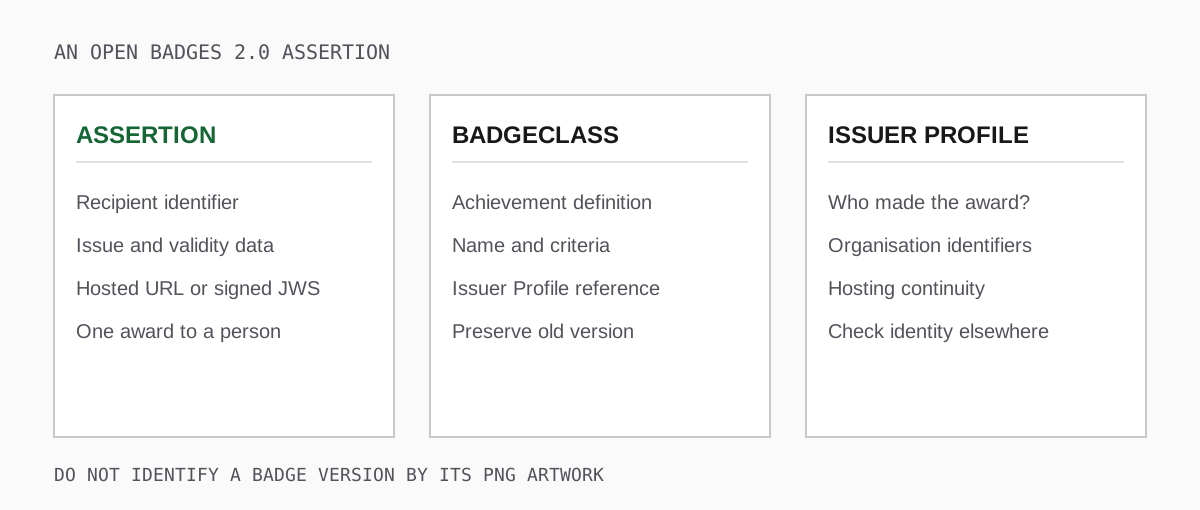
Look in the actual payload for the 2.0 context and Assertion type; do not identify its version only by the image. A baked PNG can carry 2.0 badge data, and a PNG copied through a social-media site may contain no payload at all. A share page might show the recipient's name without exposing a downloadable Assertion. Keep an untouched copy of each original format you receive before trying any conversion.
Pay particular attention to the recipient field. In 2.0 it can use an identifier such as an email address or a hash. A hash is not a matching procedure by itself. For a consequential check, you need the issuer's rules for normalisation and any salt, plus an appropriate way to confirm the recipient's identity. Do not try to identify a person from a hash by guesswork.
Hosted badges and signed badges fail in different ways
For a hosted 2.0 Assertion, the verifier retrieves the live issuer-served assertion and follows its badge and issuer references. If the organisation retires that URL, the verifier may no longer establish that the issuer still serves the award. A saved screenshot does not repair the missing source. If a domain changes hands, a live page may also be less trustworthy than it looks; check the issuer identity through an independent source.
For a signed 2.0 Assertion, the verifier checks the JWS against the issuer's public verification material. The original signed content can survive the loss of an award landing page, but key hosting and other dependencies still matter. Do not describe every 2.0 credential as unsigned or every signed assertion as permanently verifiable without network access.
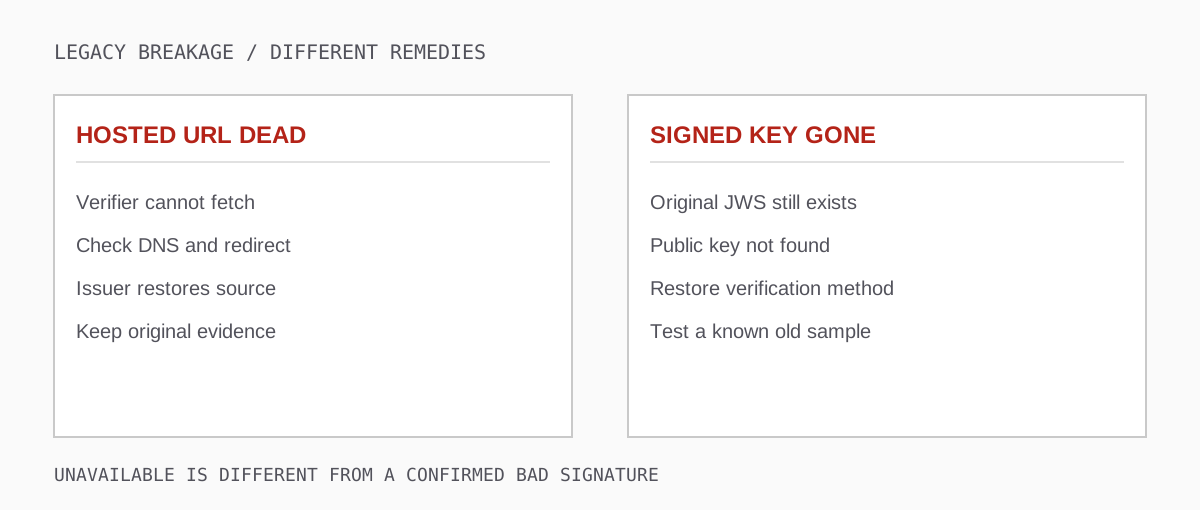
Use the 1EdTech Open Badges 2.0 validator or Badgr's 2.0 validator with an original Assertion URL, JSON, JWS or baked image. The 1EdTech tool lets you provide an optional expected recipient profile. Save which input you used, the time, and the specific result. A hosted verification result today does not guarantee the endpoint will remain up next year; a checker that cannot retrieve a URL has not proved the historical award was fabricated.
Our 3.0 validator deliberately reports a 2.0 Assertion as unsupported for its target format. Send that Assertion to a 2.0 checker rather than copying JSON fields into a new credential. Copying data cannot create an issuer-authorised 3.0 proof. For help choosing the right tool, see Open Badge validators compared.
Where you are likely to encounter 2.0
Products and long-lived deployments can issue different formats in different years or accounts. The list below identifies places where a 2.0 sample is worth requesting; it is not a claim that every current plan of these products still issues 2.0 exclusively. Verify your own export and ask each supplier which versions its specific deployment produces now.
- Legacy Badgr and Canvas Credentials installations: ask for a pre-migration award and a newly issued one; Badgr's badgecheck.io explicitly targets 2.0.
- Open Badge Factory: programmes with older school or training cohorts may need a separate historical-assertion export alongside their current issuing workflow.
- Badgecraft: youth-work and non-formal-learning programmes often have shared collections that rely on older badge URLs or issuer pages; test their actual files.
- Openbadges.me: if you inherited a school's account, request original recipient exports, badge-definition URLs and a sample from each issuance period.
- In-house systems: a university or association may have built directly against the 2018 specification. Ask the original developer what hosts Assertions, BadgeClasses, issuer Profiles and signing material.
A supplier's sales page will not tell you what your institution issued in 2020. Take one real, consented example from each cohort and inspect the decoded payload. Keep separate counts for hosted, signed, baked images with a resolvable reference, and files that are only illustrations. You can then price and prioritise preservation based on evidence rather than product branding.
Build a legacy inventory that someone can act on
Create a table per programme and issuance period. Record the Assertion format, where the original files or URLs live, the BadgeClass and Profile URLs, recipient-matching rules, the issuer domain owner, any JWS verification key, the final recipient access path, and who is responsible for keeping each resource alive. Include a small approved sample from each cohort. Keep personal identifiers out of a public spreadsheet.
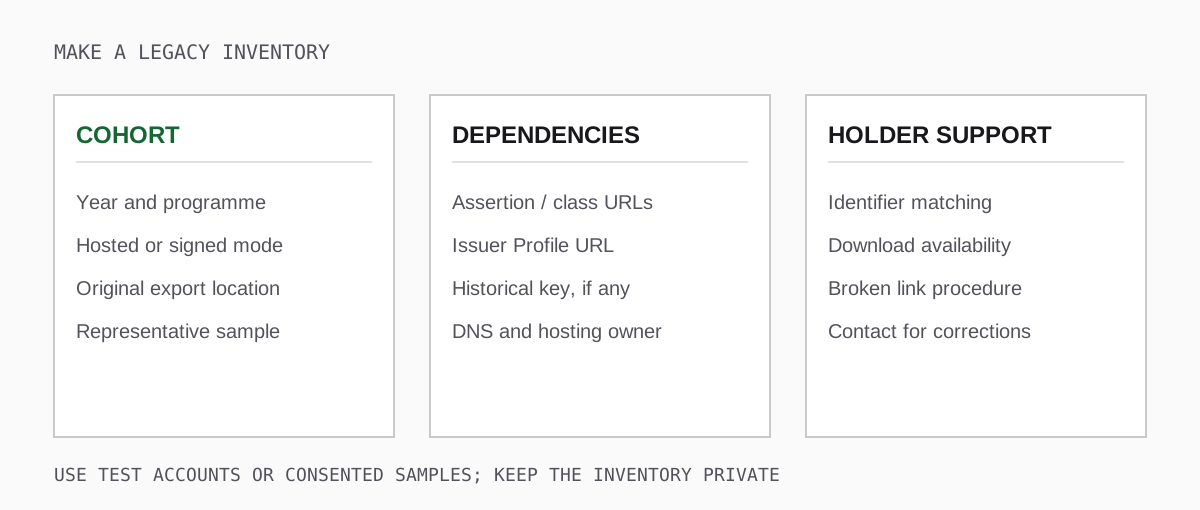
Count working URLs and broken URLs separately. If 4,000 hosted badges depend on a retiring endpoint, that endpoint is an operational priority. If a signed cohort depends on a key document hosted by a departing contractor, preserving that public method may be more urgent than changing badge artwork. Identify DNS ownership and check whether old redirects are under your control.
Take a representative sample through a 2.0 validator and save the specific error or success report. Include the badge with the oldest issue date, one with an edited BadgeClass, one whose recipient used a now-closed institutional email account, and one image downloaded from the actual recipient view. Do not paste private recipient data into a public bug tracker while investigating failures.
Set an acceptance threshold for the inventory before paying for a migration. For example, every sampled cohort must have a retrievable original award, a documented recipient-matching method, a reachable issuer Profile, and an owner for its hosted Assertion or historical verification key. Count exceptions by cause rather than hiding them in a percentage: an expired domain affecting 2,000 awards is a different problem from one lost screenshot. Give each exception a named owner, a recovery option, a deadline, and a recipient-support message. Test the oldest cohort again after the new platform goes live, when DNS, redirects and budgets have actually changed.
Preserve the old record without rewriting history
The safest default is to keep issued assertions and their meaning intact. A changed rubric should apply to future achievements or a properly versioned new BadgeClass, not retroactively change the criteria that past learners met. If the issuer must correct an error in a hosted assertion, document what changed and notify the affected holder under your programme policy. For a signed assertion, changing the content without re-signing breaks its signature.
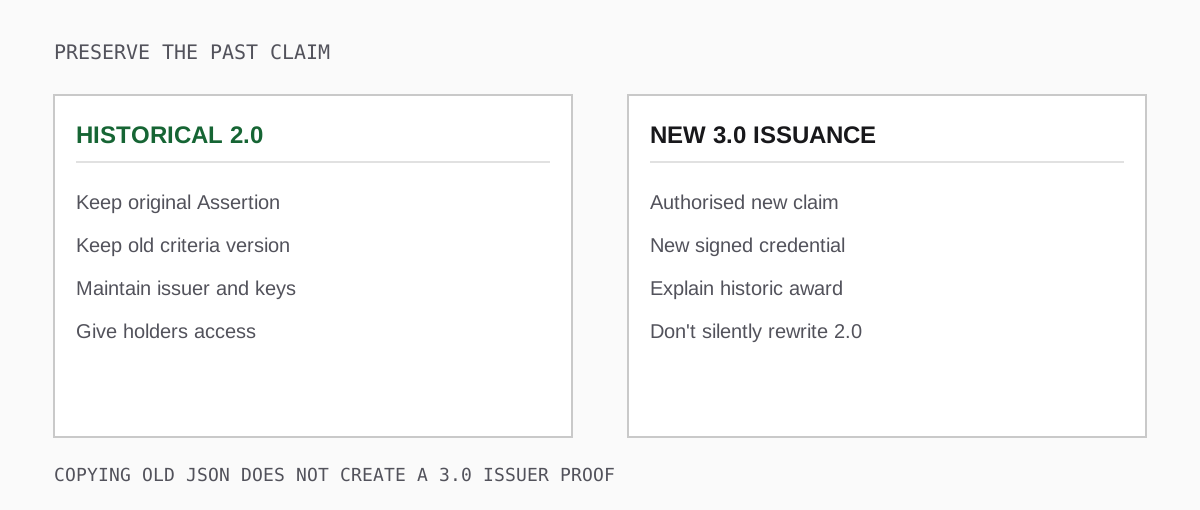
Keep backups of public badge definitions and issuer profiles, and document a continuity owner for the live endpoints. A backup stored on a private drive is useful for recovery, but it is not an alternative verification endpoint until the published URLs work. If an old URL is already dead, retain the original file, error and historical programme records; contact the issuer for confirmation or an authorised replacement. Be honest with recipients about what an external checker can and cannot now establish.
Avoid automatically "upgrading" all past badges by inserting their old values into a 3.0 JSON template. A new 3.0 badge requires the authorised issuer to make and sign a new claim. If you choose to reissue, preserve the historical award date as historical context where appropriate, distinguish the new issuance from the original event, and tell holders why they received a replacement. Never imply the original 2.0 assertion magically acquired a VC proof.
Design a two-track migration
Most programmes can run two tracks for a period. Keep 2.0 verification and recipient access available for historical awards. Issue new awards under 3.0 once an independent sample passes your required checks. If some past recipients need a 3.0 reissue for a concrete use case, prioritise those recipients and obtain the original issuing authority's approval rather than promising a blanket, instant conversion.
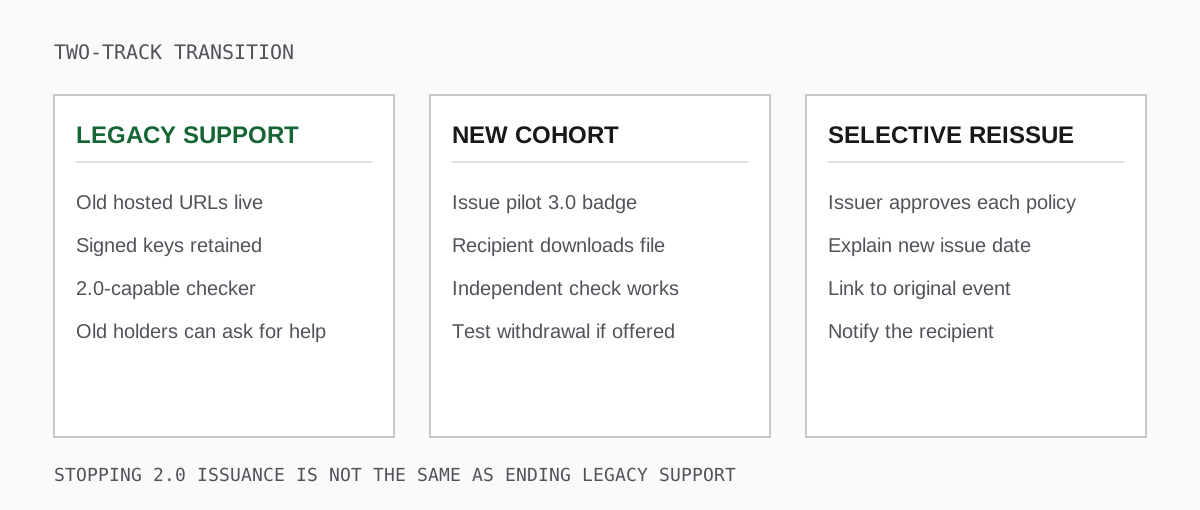
Run the transition as a small pilot. Have the new provider issue one test award based on a clearly stated rubric; let its recipient download the original credential; verify it independently; check the issuer's public key and any configured status; and have a person unfamiliar with the programme explain the claim. Only after that should you migrate the new-award pipeline. Keeping the old hosted endpoint running while new 3.0 badges are issued is a reasonable, testable intermediate state.
Plan an end date for issuing new 2.0 badges if you choose one, but separate it from an end date for supporting previously issued awards. The latter depends on recipient promises, regulatory requirements and the life of the claim. A five-year professional qualification and a once-off attendance badge may justify different retention plans. Communicate the difference to support staff so a learner is not told their old achievement has "expired" when only a vendor dashboard is being retired.
Put explicit questions in the vendor contract
A useful procurement conversation covers these details:
- Export: can holders download the original Assertion or signed JWS, and can we export already issued badges in a documented, recipient-safe format? A CSV of badge artwork is insufficient.
- URL continuity: who maintains hosted Assertions, BadgeClasses and issuer Profiles after cancellation? Specify redirects, DNS and a maintenance period.
- Historical keys: which signed cohorts use which verification methods, and who will continue to publish the old public material after rotation?
- Recipient matching: how do we confirm a holder whose old email no longer works, including hashed-identifier rules and privacy controls?
- Withdrawal and corrections: how does the product handle a wrongly issued hosted or signed 2.0 badge, and how are affected recipients notified?
- Transition: which exact product, plan and export format will produce new 3.0 awards? Which sample credential and 1EdTech directory entry support the claim?
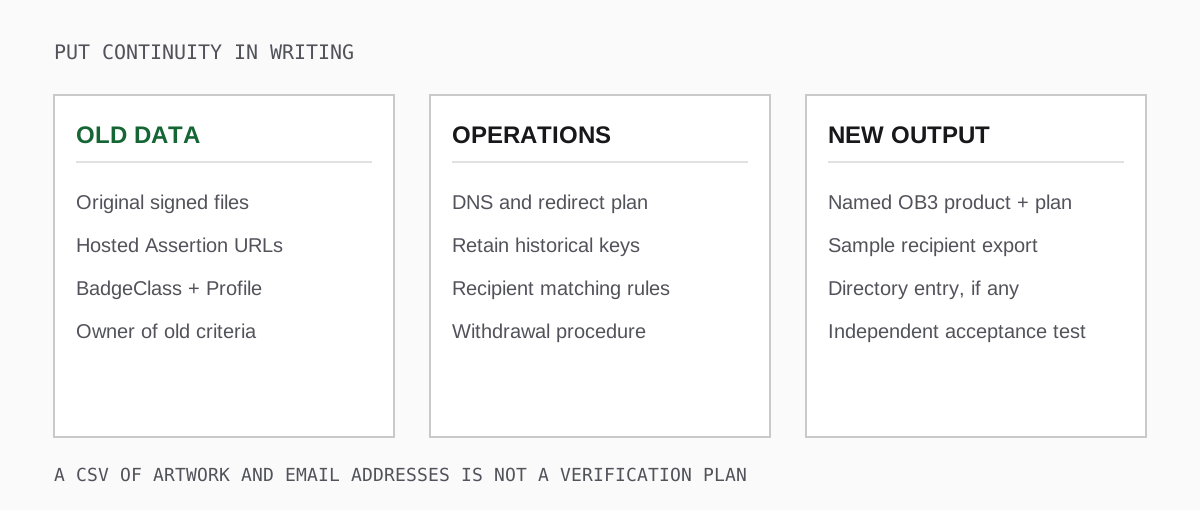
Ask the vendor to demonstrate the answers using an account configured like yours. A general "data export" clause may cover names and designs while excluding the public URLs and cryptographic material on which external verification relies. Give the exit plan an owner within your organisation, not just a sentence in a sales proposal.
What to tell holders and verifiers
A holder should keep the original downloaded file or URL and the issuer's delivery email. A social-media screenshot may be useful for display but usually cannot be verified by itself. If their hosted URL stops working, they should ask the issuing organisation for a fix, an official confirmation, or an authorised new credential. They should not edit the assertion to make it pass a tool.
A verifier should identify the version first, use a 2.0-capable checker, and read its actual findings. A failed fetch is an unavailable source; a signature mismatch is a different problem; a recipient mismatch needs investigation before linking the award to an applicant. Confirm the issuer independently when the decision matters. See how to validate an Open Badge for the wider decision workflow.
The goal of this migration is measurable: a recipient from the oldest cohort can still present the achievement they earned, a verifier can state exactly which checks worked, and a new recipient gets a portable 3.0 credential under a deliberate policy. For choosing the new issuer, use the platform evaluation guide and the 1EdTech Open Badges 3.0 specification.