What actually keeps a digital credential secure
A practical security model for digital credentials: proof boundaries, key rotation, revocation, holder checks, and incident response.
Verify Open Badge · Jul 6, 2026 · 6 min read
Imagine a hiring team receives an attractive badge for a safety qualification. The file verifies, but the issuer is an unknown domain, the badge has no status information, and the applicant cannot show that the credential refers to them. The signature answered one question; the hiring decision needs three.
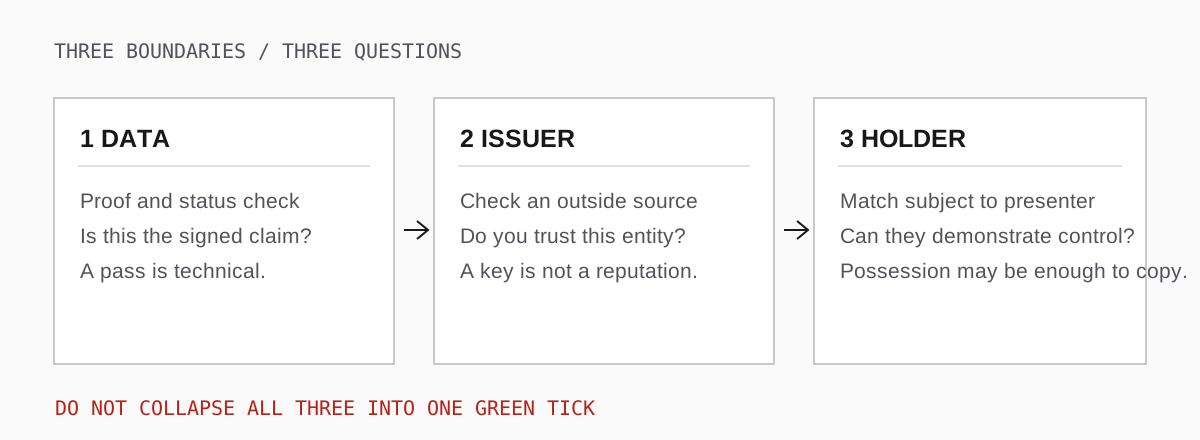
Open the three-boundary diagram at full size.
Use those boundaries when designing an issuing programme or reviewing somebody else's credential. They expose where technical checks stop and a human decision starts.
What the signature covers, and what it cannot
For a signed Open Badges 3.0 credential, the proof protects the credential data it covers. An embedded Data Integrity proof and a signed VC-JWT use different verification procedures, but each lets a verifier detect a change to the protected claim without access to the issuer's private key. Changing the achievement or subject in an already signed credential should invalidate its proof. Editing a logo on a webpage may not, because the webpage may not be part of the signed credential.
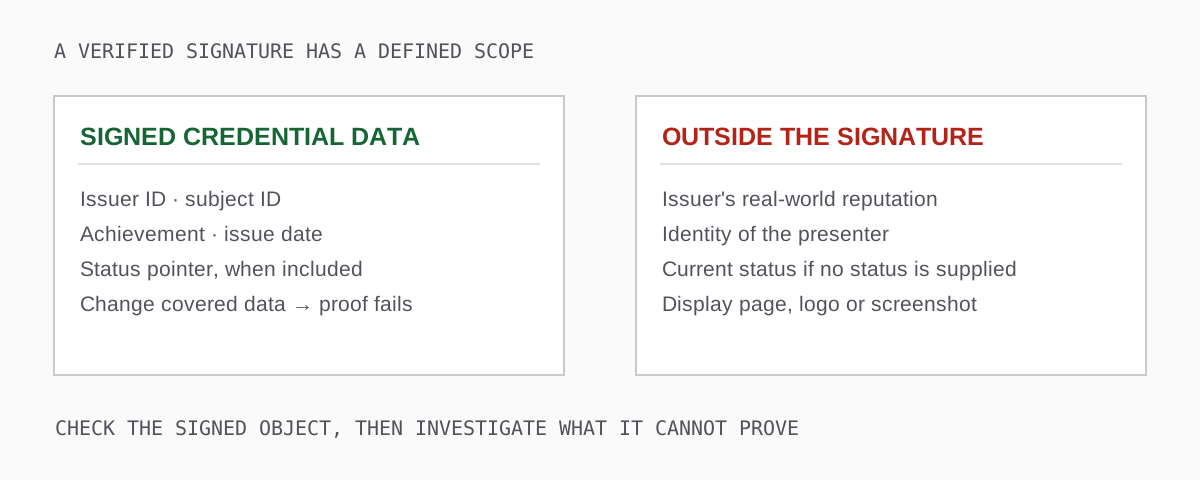
Open the signature-scope diagram at full size.
This distinction matters when vendors say a badge is "tamper-proof." Ask what bytes are signed, whether the export contains the proof, and whether the verifier can fetch the named verification method. If the badge is a separate PNG and the signed credential is a JSON download, distribute both and label them accordingly. A screenshot of either one is not a credential.
Confirm who controls the verification key
A proof pass means the data verifies against a particular key. It does not establish that the real-world organisation whose logo you recognise controls that key. Confirm the issuer identifier through an independent channel, such as the institution's own website or an existing contractual relationship. A domain that resembles the institution's name is not sufficient. For a DID, resolving the DID finds verification material; it does not magically confer a reputable identity on the DID controller.
Legacy Open Badges 2.x also has hosted and signed assertions. A hosted 2.x assertion can be genuine without a modern cryptographic proof. Identify the format before treating "no 3.0 proof" as a security finding; see the format history for the difference.
Protect signing authority, then plan to change it
A stolen private key can create credentials that look as if your organisation issued them. Restrict signing to an issuing service, use a dedicated key store where practical, log who can trigger issuance, and require a second approval for new badge definitions with consequential claims. Keep the production signing key out of design tools and spreadsheets. An administrator who can add recipients is not necessarily someone who should be able to export signing material.
Rotation is routine maintenance. Publish a new verification method for newly issued badges, but retain the old public verification method for badges already issued with it. Old credentials keep pointing to their original method; changing your current issuer profile does not rewrite their proofs. Test an old badge after each DID document, domain, CDN, or key-host migration.
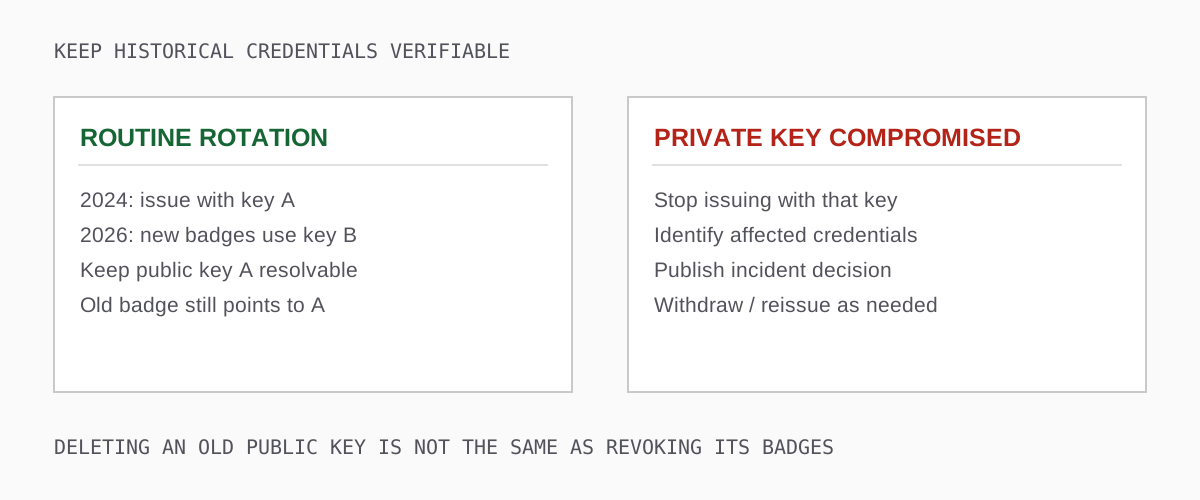
Open the rotation versus compromise diagram at full size.
Compromise needs a different playbook. Stop issuing with the affected private key, find which credentials relied on it, and decide which claims must be withdrawn or reissued. Keeping a compromised verification method online for historical verification without an incident policy can let forged credentials appear valid. Deleting it blindly makes genuine old credentials unverifiable. Document the decision and notify holders and relying parties through your normal incident channel.
For a small programme, keep a key inventory with the verification-method URL, start and stop dates, custodian, recovery procedure, and one old sample credential for each retired signing key. That sample is your migration test.
Make status a deliberate part of issuance
A valid signature can outlive the facts it once described. A certificate can expire; an incorrectly issued one can be revoked; a suspension can be temporary. Those should not be presented as the same event.
Open Badges 3.0 credentials can carry a credentialStatus reference to a status mechanism such as the W3C Bitstring Status List. The verifier follows the reference and checks the relevant entry. Status is optional: when an issuer does not include a status reference, a verifier cannot infer that the credential has never been withdrawn. When a list is temporarily unreachable, that is also not evidence that the entry is clear.
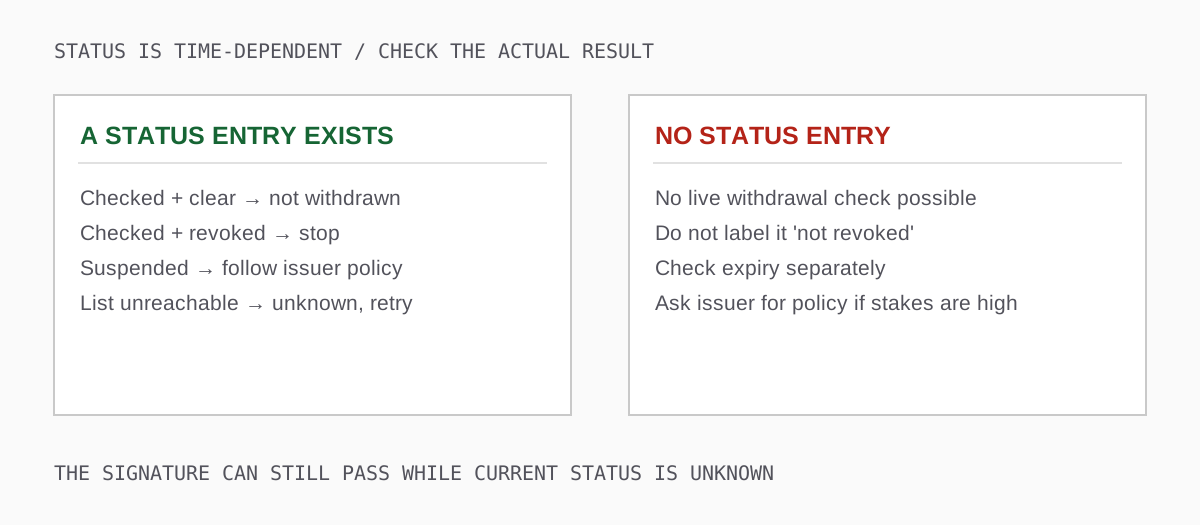
Open the status-outcomes diagram at full size.
If you need later revocation, add status when you issue the credential. You cannot retroactively add a pointer to a signed copy without issuing a new one. Test a real revocation using a disposable credential before your first cohort; record how long your cache or platform takes to reflect the change. Set an availability target for the list and know who responds when the endpoint is down.
Expiry belongs to the credential's validity window, not to a manually painted date on the image. A credential can be expired and still accurately record that somebody completed an assessment in the past. Your policy determines whether that historical achievement is sufficient for the present task.
Prove the credential refers to the presenter
Even a perfectly signed credential is easy to forward. Its subject identifier might be a name, an email-derived identifier, a DID, or another value. That field identifies the subject of the claim; it does not authenticate whoever forwarded the file.
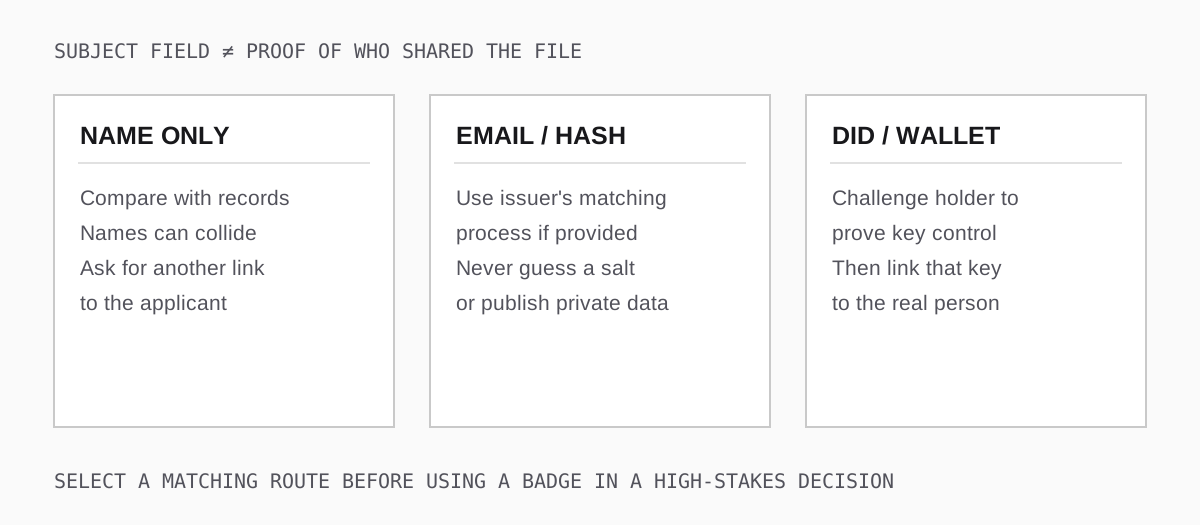
Open the holder-matching diagram at full size.
For a low-stakes participation badge, a name plus an ordinary applicant conversation may be adequate. For a licence that authorises work, decide on a holder-matching procedure before using the badge to approve someone. A DID can support a challenge demonstrating control of a key, but you still need to connect that key to the person in front of you. A hash is not self-explanatory either: a verifier needs the issuer's matching rules, including any salt, rather than trying to guess the holder's email. An ordinary badge file is not automatically a holder-bound presentation.
Privacy changes the design. Do not publish a personal email simply to make a verifier's job easier. If your programme relies on subject matching, document a holder-controlled or issuer-supported route that does not require public disclosure of unnecessary personal information. Test it with a recipient who no longer has access to their school or workplace email.
Treat validator output as a diagnostic report
A single green or red icon hides distinctions that matter. A malformed download, an unsupported proof, a temporarily unreachable key, and an issuer-revoked badge call for different responses. In our validator, open the individual checks and read the issue's code, path, and message. A proof_verification_failed code by itself does not prove malicious editing; the message may explain that the verifier found no supported proof candidate.
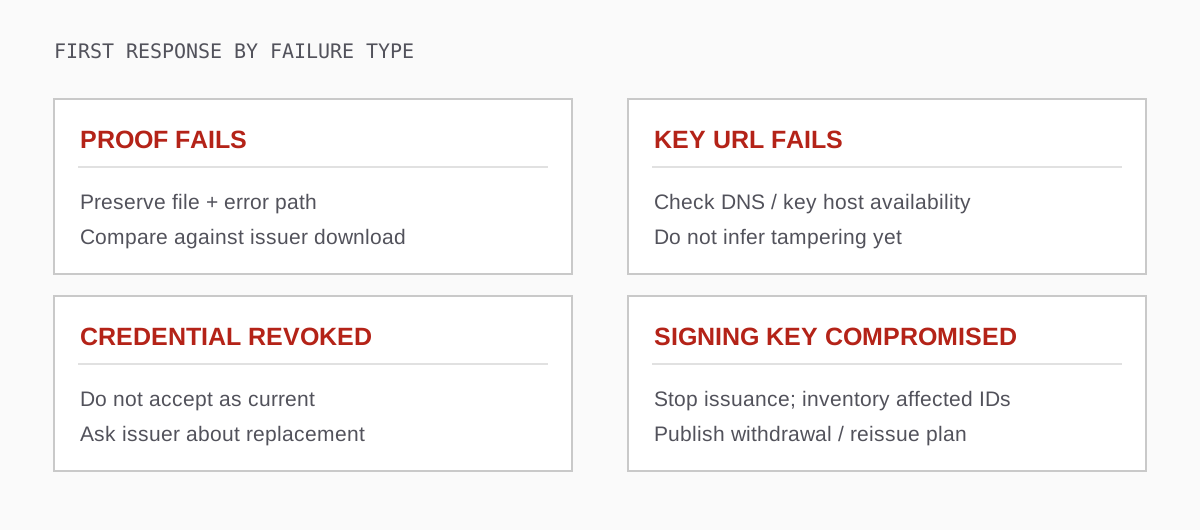
Open the incident-triage diagram at full size.
If proof fails, preserve the original export and its error details. If a verification-method URL fails to resolve, check the issuer's key host and retry once before concluding anything about the signature. If status says revoked, do not accept it as current and ask the issuer about a replacement. If your own signing key is compromised, stop issuance immediately and work from your inventory of affected credentials. The result codes list helps distinguish a broken copy from a credential problem.
A release test with a real answer
Before launching a new badge, issue three disposable credentials: one valid, one that you revoke, and one whose protected claim you deliberately alter in a copy. Check all three in an independent validator. Confirm that the valid badge passes the relevant checks, the revoked badge is reported as withdrawn, and the modified one does not verify. Then have somebody outside the issuing team confirm the issuer from an independent source and try the documented holder-matching route.
Keep the test results with dates and repeat them after a key rotation, status-service change, or issuer-domain migration. This gives you evidence that the security properties still work after the launch presentation is over. For the receiver's side of the process, use the step-by-step validation checklist.